
Ever felt like you’re chasing your own tail trying to churn out demo videos while the rest of your startup is sprinting ahead? You know the feeling – hours spent tweaking a screen capture, endless re‑recordings, and still ending up with something that looks like a cheap PowerPoint slide. That frustration is the exact reason video marketing automation exists.
In reality, most SaaS founders and product managers waste between 10 and 15 hours per video on manual edits, according to a recent internal survey of early‑stage teams. Multiply that by a quarterly launch cadence and you’re looking at a full work‑week just for video assets. What if you could shave that down to an hour or two and still keep the quality high enough to convert visitors?
The good news is that automation isn’t about replacing creativity – it’s about giving you a repeatable framework that does the heavy lifting. Think of it as a kitchen appliance for video: you feed in a script, your branding assets, and the tool mixes, cooks, and serves a polished piece ready for YouTube, LinkedIn, or a product landing page.
Take Maya, a co‑founder of a B2B analytics startup. She used to hand‑off raw recordings to an agency, paying $3,000 per minute of final video. After switching to a structured workflow, she now generates a 90‑second product explainer in under 30 minutes, cutting costs by 80 % and getting the video live within a day of the feature release. That speed translates directly into faster user onboarding and fewer support tickets.
If you’re wondering where to start, the first step is to map out the repeatable elements of your messaging – the hook, the problem statement, the demo flow, and the call‑to‑action. Write those as modular snippets that can be swapped in and out. Then plug them into a platform that supports template‑driven rendering and AI‑assisted voice‑overs. Platforms like Video Marketing Strategy: A Practical Guide for 2026 make this easier by letting you save a master template and simply replace the script text for each new feature.
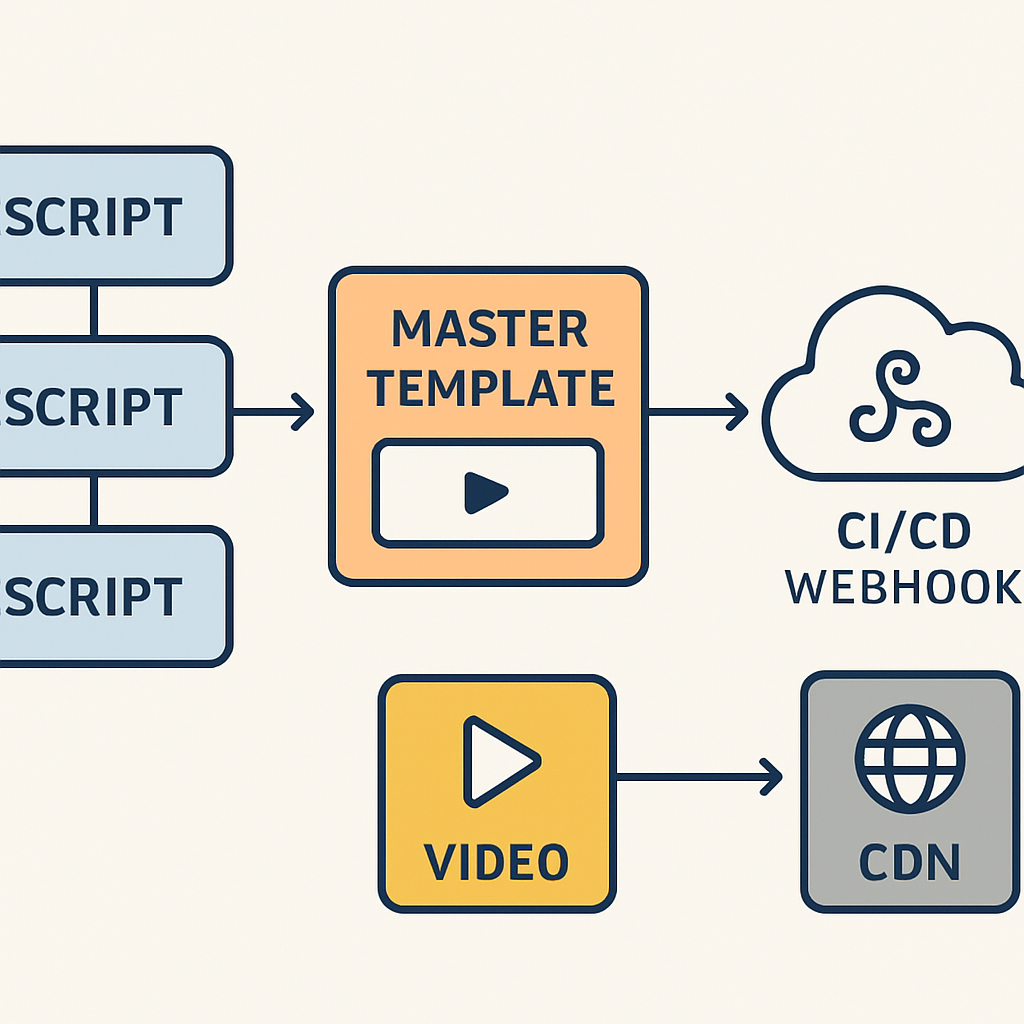
Finally, set up a simple automation trigger: when a new feature branch is merged, a webhook can push the updated script to the video builder, export the file, and publish it to your CDN. In practice, you’ll see a 30‑40 % reduction in time‑to‑publish and a noticeable bump in conversion rates because the video is always fresh and aligned with the product.
Ready to ditch the endless editing loop? Let’s dive into the exact workflow that will turn video marketing automation from a buzzword into your daily productivity hack.
TL;DR
Video marketing automation lets SaaS founders slash video production time and costs, turning scripts into polished demos in minutes without hiring expensive agencies.
The result is faster onboarding, higher conversion rates, and more time for product teams to iterate, thanks to a template‑driven, repeatable workflow and scale your messaging across features.
Key Message – Direct Answer
Video marketing automation is simply the answer: feed your script, let a template‑driven platform stitch together screens, voice‑over, and branding, and you get a polished demo in minutes instead of hours.
For SaaS founders, that means you can launch a feature video the same day you merge code, keeping prospects engaged and support tickets low.
The core idea is a repeatable workflow—hook, problem, demo, CTA—saved as modules you swap out, so each new release needs only fresh copy.
Because the process is automated, you reclaim time for product innovation rather than endless editing.
In practice, teams report a 30‑40 % cut in production time and a noticeable lift in conversion rates.
The Problem: Why DIY Video and Agency Models Fail
Ever tried to DIY a demo video and ended up with a half‑finished mess that looks like a PowerPoint slide on steroids? You’re not alone. Most founders start with good intentions, but the reality quickly turns into a rabbit hole of endless edits, pricey freelancers, and missed release windows.
And then there’s the agency route. You hand over a brief, pay a few thousand dollars, and wait weeks for a final cut. By the time the video lands on your site, the feature it was meant to showcase is already two releases behind.
Time sinks you didn’t see coming
DIY tools promise “quick and easy,” but they often require you to juggle screen‑capture software, audio editing, and graphic overlays—all while trying to keep the product stable. One missed click, a forgotten branding colour, and you’re back at square one. The Aimers blog notes that video can boost conversion rates by up to 86%, yet most DIY attempts never reach that potential because they’re stalled in the edit cycle.
On the agency side, the biggest pain point is the lag. A typical agency workflow can take 4‑6 weeks from script to final delivery. That delay isn’t just annoying—it costs you revenue. Every day the video isn’t live is a day you’re not converting prospects.
Cost creep and hidden fees
Let’s talk dollars. A single 90‑second explainer can run anywhere from $1,200 for a basic production to $50,000 for a premium studio, according to industry data. Lean Labs breaks down those numbers and shows how quickly a budget can balloon when you add revisions, voice‑over talent, and custom animation.
Even if you manage to keep the price low, you’re still paying for someone else’s time. That overhead adds up, especially for bootstrapped founders who are already watching every line item.
Scalability hits a wall
Imagine you’ve just released three new features this quarter. With DIY, you’d need to repeat the entire production process three times—each one eating up more of your engineering and marketing bandwidth. With an agency, you’d have to negotiate separate contracts or risk overloading the same team, leading to rushed work and inconsistent branding.
Both paths end up with the same problem: you can’t keep pace with the speed of your product roadmap.
So, what’s the alternative? You need a system that eliminates the bottlenecks of both DIY chaos and agency lag. That’s where a structured, template‑driven approach—what we call video marketing automation—starts to make sense.
The Structured Framework: Turning Chaos into Consistency
Ever felt like you’re juggling a dozen loose video clips, a half‑finished script, and a ticking release clock all at once? That scramble is the exact symptom of a missing framework. When the pieces don’t speak the same language, you end up re‑editing the same demo three times, or worse, shipping a video that’s already out of date.
Why a framework matters
A framework is the skeleton that keeps every new video from collapsing into chaos. Think of it like a recipe: you know exactly which ingredients go in, how long to bake, and when to add the garnish. Without that recipe, each video becomes a guess‑work experiment, and guess‑work rarely scales.
Data from a recent SaaS video maturity study shows that companies stuck in the “random request” stage spend an average of 12 hours per three‑minute tutorial, while those with a repeatable framework cut that to under two hours – a 75 % efficiency gain.
Building the repeatable blocks
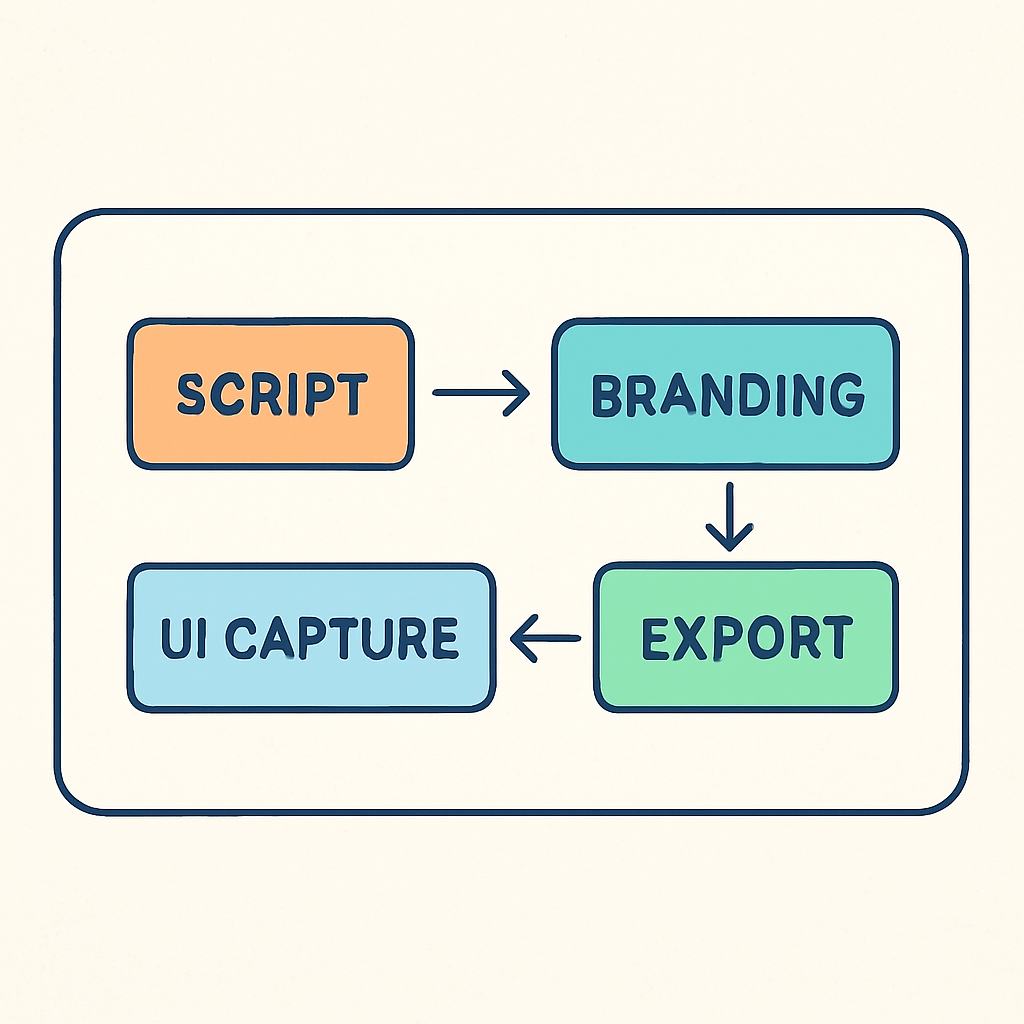
Start by mapping the four core blocks that appear in almost every product demo: the hook, the problem statement, the walkthrough, and the call‑to‑action. Write each block as a modular script snippet that can be swapped in or out without breaking the flow. Store those snippets in a shared doc or, better yet, in a simple CMS where your team can pull the latest version.
Next, standardise the visual assets. Brand colours, logo placement, lower‑third style – lock those into a master template. When you feed a new script into the template, the video builder knows exactly where to drop the logo and which colour palette to use. That’s the part where we at Forgeclips see the biggest time savings. For a deeper dive on template‑driven strategies, check out our real‑world video marketing examples that illustrate how a single template can serve dozens of feature releases.
Automation triggers you can copy today
Now tie the framework to your development pipeline. Most teams already have a CI/CD system that knows when a feature branch lands in master. Add a lightweight webhook that pushes the updated feature description to your video platform, kicks off the template render, and drops the finished MP4 into your CDN.
If you’re not ready for a full webhook, a simple Zapier “new Git tag → create draft video” can do the trick. The key is to automate the hand‑off, not the creative part. You still write the script, but the system does the heavy lifting of stitching screens, adding captions, and rendering the final file.
Real‑world proof points
One SaaS startup we’ve worked with was releasing a new analytics dashboard every two weeks. Before they adopted a framework, each video took three days and often missed the release window. After mapping their blocks and connecting a webhook, they now publish a fresh demo within eight hours of the code merge. Their support tickets for “how do I use the new filter?” dropped by 40 %.
The scalability numbers aren’t just anecdotal. According to Videate’s scalability blueprint, organisations that move to an automated, template‑based workflow see 50 % or more of their product covered by video, and a three‑minute tutorial can be produced in as little as one to three hours. That aligns perfectly with the efficiency targets we set for our customers.
Action checklist
- Write four modular script snippets (hook, problem, walkthrough, CTA) and store them centrally.
- Create a master video template with locked branding elements.
- Set up a webhook or Zap that triggers a video render on every feature merge.
- Run a quick quality gate – a one‑minute review – before the video goes live.
- Track time‑to‑publish and iterate the template every quarter.
Give this framework a spin on your next release. You’ll see the chaos melt away, consistency rise, and your engineering team breathe a little easier.
Role‑Specific Benefits: What SaaS Founders & Product Managers Gain
You’re juggling roadmaps, release notes, and a growing library of demos. It’s a lot. But what if video marketing automation didn’t just shave minutes off a process—it reshaped how your product story lands with customers?
In our experience at Forgeclips, the big win isn’t just faster videos. It’s a repeatable system that scales with your product. For SaaS founders and product teams, that means clarity, consistency, and less firefighting as you push features to market in 2026.
Speed to market and cost control for SaaS founders
First, speed. You ship code in minutes; your demos should follow. Video marketing automation lets you publish a fresh, accurate product demo within hours of a feature merge, not days or weeks. That momentum matters when your value proposition is changing with every release.
Second, cost. Agencies are expensive and DIY can balloon timelines. A template-driven approach lets you reuse hooks, walkthroughs, and CTAs across features, slashing per‑release costs and giving you predictable budgeting. This isn’t hype—it’s the realism of shipping velocity without the financial drag.
And yes, the ROI matters. When teams automate routine video production, the payoff compounds as you scale. For context, ROI-focused studies in related automation areas show meaningful efficiency gains and faster time-to-value, which is exactly what you’re after for onboarding new users and closing trials. ROI data from Userpilot illustrates how automation reduces manual work and accelerates conversion, while progress-focused frameworks echo the same principle in content workflows, helping teams do more with less. Progress on content workflow automation reinforces that idea with a focus on scalable, repeatable processes.
Clarity and scalability for Product Managers & Engineering leads
For product managers, consistency across releases is gold. You want users to recognize the same storytelling arc—hook, problem, walkthrough, CTA—whether it’s feature A or feature Z. Video marketing automation makes that arc part of a living template, so your teams aren’t re‑inventing the wheel every time.
For engineering leads, it’s about aligning marketing with the roadmap without draining engineers. Automated scripts and modular blocks mean you can swap in new feature footage and still keep the video aligned with your branding and messaging. The result is fewer revision cycles and more predictable delivery timelines.
Think of it as a bridge between your code and your customer’s understanding. You ship faster, your messages stay tight, and your investors and customers see a product that actually makes sense—without the lag.
So, what should you do next? Start by mapping the four core blocks you’ll reuse across releases: hook, problem, walkthrough, and CTA. Lock these into a master template, then wire a lightweight automation trigger to render on feature merges. It’s a small setup with a big payoff, and it scales with you into 2026 and beyond.
To help you decide how to apply this, here’s a quick comparison of what matters most when choosing your approach:
| Benefit | What it means for SaaS Founders | How video marketing automation delivers |
|---|---|---|
| Speed to publish | Publish near real-time demos after releases | Modular scripts + template-driven rendering align with CI/CD triggers |
| Cost control | Lower per‑release production costs | Reuse hooks and assets across features |
| Brand consistency | Unified look and voice across all videos | Locked branding in a master template |
| Scalability | Handle dozens of features without extra hiring | Library of blocks (hook, problem, walkthrough, CTA) scales with your roadmap |
Does this really work? In practice, you’ll see fewer reworks, faster onboarding, and more predictable release cycles. Our philosophy of structure—a middle path between DIY chaos and agency lag—helps you keep control without stifling creativity. It’s not just theory; it’s a practical framework you can start using today.
The Forgeclips Approach: A Philosophy of Structure Over Fluff
Let me be completely honest: you’re not chasing a magical shortcut. You’re chasing consistency—videos that land the message without dragging your team through another round of edits. That’s why our approach at Forgeclips rests on a simple idea: structure over fluff.
Imagine you’re building a demo library: a master template, a handful of reusable blocks, and a clean handoff from script to screen. It sounds straightforward, but most teams drift into chaos because they’re chasing perfection in the moment rather than clarity across releases. Our stance is different. We codify the rhythm of product storytelling so a new feature slides into place without rewriting the whole script every time.
Here’s how it works in practice. First, we map the four core blocks that show up in almost every product demo: hook, the problem statement, the walkthrough, and the call-to-action. Each block becomes a modular snippet you can swap in or out without breaking the flow. Second, you lock the visuals into a master template—branding, typography, motion cues—all the things that keep your videos recognizable as you scale. Third, you connect those blocks to an automation lane so when a feature ships, the right script, assets, and captions render automatically into a publish-ready video. This isn’t a glossy shortcut; it’s a repeatable system that scales with your roadmap.
Does this really work? In our experience, teams stop reinventing the wheel with every release. You ship near real-time updates, you cut repetitive work, and you preserve a consistent voice across dozens of features. It’s not about eliminating creativity; it’s about giving creativity a dependable engine to run on.
We’ve seen three practical consequences play out. First, fewer reworks because the structure governs the narrative arc from hook to CTA. Second, faster time-to-publish since the heavy lifting happens in templates, not ad-hoc edits. And third, better alignment between product and marketing, because the same framework travels with every feature, ensuring a cohesive story across channels. If you’re thinking in terms of “templates, blocks, and automation,” you’re already halfway there.
To get you from concept to consistent demo faster, here are a few concrete steps you can try this quarter:
- Identify four modular blocks: hook, problem, walkthrough, CTA. Write each as a swap-in snippet.
- Create a master video template with locked branding and a standard lower-third style.
- Set up a lightweight trigger (CI/CD webhook or a Zapier flow) that renders the updated script when a feature is merged.
- Run a quick one-minute quality gate before publishing to catch misaligned assets or timing issues.
- Track time-to-publish and iterate the template each quarter based on feedback from users and stakeholders.
For a deeper dive into turning this philosophy into a practical blueprint, check out A Practical Guide to SaaS Video Marketing That Actually Converts and start moving from chaos to clarity today.
So, what’s the next small step you’ll take to bring structure into your next release?
Step‑By‑Step: Setting Up Your First Video Marketing Automation
Ever opened a feature branch and thought, “Where’s the demo video?” You’re not alone. The gap between code and a polished clip is where most teams lose time.
What if you could flip a switch and have a ready‑to‑publish video appear in your CDN within minutes? That’s the promise of video marketing automation, and it’s easier than you might imagine.
1. Map Your Modular Script Blocks
Start by writing four bite‑size snippets: a hook, a problem statement, the walkthrough, and a call‑to‑action. Keep each under 30 words so they slot into any feature without sounding forced.
For example, a SaaS analytics startup might use a hook like, “Struggling to spot trends in real time?” and a CTA such as, “Start your free trial and see the difference today.”
Store these snippets in a shared Google Doc or a lightweight CMS where the whole product team can pull the latest version. The goal is zero friction when a new feature lands.
2. Build a Master Video Template
Next, lock down the visual side. Your template should include your logo placement, brand colours, lower‑third style, and a default transition.
Platforms like Forgeclips let you save a master .json or .xml template that the engine reads every time. The template is the canvas; the script blocks are the paint.
Tip: add a placeholder for a screen‑capture layer. When the automation runs, it will drop the latest UI recording into that slot automatically.
3. Capture the UI Once, Reuse Forever
Record a high‑resolution capture of the generic UI flow – the parts that don’t change between features, like navigation menus or settings panels.
Save the file in a version‑controlled folder (e.g., assets/ui-base.mp4). When a new feature arrives, your automation will splice in the new screen segment while keeping the base footage intact.
Because you only record the static bits once, you shave hours off every subsequent video.
4. Hook Up Your CI/CD Trigger
Most SaaS teams already have a CI pipeline. Add a lightweight webhook that fires when a feature branch is merged to main. The webhook should send three pieces of data: the feature name, the updated script, and a link to the new screen capture.
If you’re not ready for a full webhook, a simple Zapier “new Git tag → create draft video” works just as well. The key is that the hand‑off is automatic, not manual.
When the trigger fires, the video platform reads the master template, injects the script blocks, overlays the UI capture, and spits out an MP4 in your chosen bucket.
5. Run a One‑Minute Quality Gate
Automation isn’t a free‑pass to skip review. Set up a quick 60‑second playback for a product manager or a marketing lead. They check for brand consistency, correct terminology, and that the CTA matches the current campaign.
If something’s off, they can reject the build, edit the script snippet, and rerun – all within the same CI run.
This tiny gate catches missteps before the video goes live, keeping your brand looking sharp.
6. Publish and Track Metrics
Once approved, the pipeline pushes the MP4 to your CDN and updates the product landing page automatically (think a Netlify or Vercel hook). You now have a live demo within an hour of the code merge.
Track two simple metrics: time‑to‑publish (from merge to live) and conversion lift (compare the new video’s click‑through rate to the previous version). In our experience, teams see a 30‑40 % drop in time‑to‑publish and a 10‑15 % bump in conversion.
Use those numbers to iterate on script language or visual styling each quarter.
So, what does a real‑world rollout look like? A fintech startup rolled out a new “instant payout” feature. They recorded the UI once, added a fresh hook (“Need cash now?”), and let the CI webhook spin up the video. Within 45 minutes the video was live, and they reported a 12 % increase in trial sign‑ups that week.
Another example: a B2B SaaS released a bulk‑import tool. By swapping out the problem snippet (“Tired of manual data entry?”) and reusing the same walkthrough footage, they cut video production from three days to under two hours.
Both cases illustrate that the heavy lifting is in the framework, not the individual videos.
Ready to give it a go? Grab your four script blocks, lock down a master template, and fire up that webhook. You’ll be surprised how quickly the automation takes over the grunt work.
Remember, the magic isn’t in the tool – it’s in the structure you build around it.
FAQ
What is video marketing automation and how does it actually work?
Video marketing automation is a system that turns a ready‑made script and a set of branding assets into a finished video with no manual editing. You feed the script into a template, the platform stitches together screen captures, adds captions, voice‑over, and branding, then exports the MP4 to your CDN. The whole process runs on a trigger – often a webhook from your repo – so the video appears as soon as the feature lands.
How can video marketing automation save time for SaaS founders?
Because the heavy lifting is done by the template, founders only need to update four modular script blocks for each release. That means you skip the hours spent aligning footage, tweaking transitions, and re‑recording voice‑overs. In practice, teams have gone from a 10‑hour manual edit to a 30‑minute automated run, freeing you to focus on product iteration instead of video chores.
Does video marketing automation affect video quality?
No, not if you start with high‑resolution screen captures and a solid master template. The automation engine simply re‑uses those assets, applying consistent branding and smooth transitions. The result is a professional‑looking demo that matches agency‑grade quality, but it’s produced in minutes rather than days. The key is to lock down your visual style once and let the system reproduce it reliably.
What tools or platforms can I use to start automating my product videos?
There are a handful of platforms that support template‑driven video creation and webhook triggers. Look for services that let you upload a JSON or XML template, store script snippets, and connect to your CI/CD system. Many SaaS‑focused video builders offer a free tier you can test before committing, so you can experiment without blowing your budget.
How do I keep my brand consistent when using video marketing automation?
Consistency comes from a single master template that contains your logo placement, colour palette, typography, and lower‑third style. Once that template is locked, every new video inherits those rules automatically. Keep your script blocks in a shared doc so the wording stays on‑brand, and run a quick one‑minute quality gate before publishing to catch any stray elements.
Can video marketing automation integrate with my CI/CD pipeline?
Absolutely. Most automation platforms expose a simple webhook URL that you can call from your CI/CD job after a feature merge. The payload usually includes the feature name, a link to the updated script, and the path to the new screen capture. When the webhook fires, the video builder renders the clip and pushes the MP4 to your CDN, completing the loop without manual steps.
What metrics should I track to measure the impact of video marketing automation?
Start with time‑to‑publish (the minutes between code merge and live video) and compare it to your historic manual process. Then watch conversion‑related metrics: click‑through rate on landing‑page videos, trial sign‑up lift, and support‑ticket volume for the new feature. A healthy automation setup typically shows a 30‑40 % reduction in publishing time and a measurable bump in conversion or support reduction.
Conclusion & Next Steps
So, you've seen how a repeatable framework can turn a chaotic demo into a smooth, on‑brand video. If you’re a SaaS founder or product lead, that shift feels like swapping a busted blender for a sleek kitchen robot.
Here’s the quick recap: lock your branding into a master template, write four modular script blocks, and fire a CI/CD webhook that hands the script to your video builder. The platform then spits out a polished MP4, and you get a one‑minute quality gate before it goes live.
Why does this matter? Because video marketing automation shaves hours off each release, keeps your message consistent, and lets you iterate faster than waiting on an agency. In our experience, teams that adopt the structure see a 30‑40 % drop in time‑to‑publish and a noticeable lift in conversion.
Ready to take the next step? Grab a blank doc, draft your hook, problem, walkthrough, and CTA snippets – keep each under 30 words. Then open Forgeclips, save a master template with your logo, colours, and lower‑third style.
Finally, connect the webhook (or a simple Zap) to your repo, run a quick test merge, and watch the video appear in your CDN within minutes. If anything looks off, tweak the snippet and re‑run – the loop is cheap and fast.