You need a great product demo video. You probably needed it yesterday.
But you’re caught between two options that both feel like a trap: the messy, time-consuming DIY route or the slow, wallet-draining agency path. This is where a modern SaaS product demo video maker changes the game, offering a structured path to a high-quality video without the usual chaos.
That Familiar Feeling of a Stalled Demo Project
Let’s be honest, the whole process of getting a product demo video made often feels broken. You know the potential is huge—higher conversion rates, fewer support tickets, and a landing page that finally pulls its weight.
Yet, the path is littered with roadblocks familiar to any SaaS founder or product manager. It’s a classic dilemma with no clear winner.
The DIY Trap
The do-it-yourself route always starts with good intentions. You think, "How hard can it be?" So you stitch together a screen recorder, a clunky video editor, and maybe a cheap microphone from Amazon.
Soon enough, reality hits. Your mouse zips around the screen, the audio has a weird echo, and the final cut looks more like a high-school project than a professional showcase for your sophisticated software.
The real cost isn’t just the wasted hours; it's the missed opportunity. An amateurish video can actively harm your credibility. It screams "we cut corners," which is the last message you want to send a potential customer.
The Agency Drain
Burned by the DIY trap, many swing to the other extreme: hiring a video production agency. This path seems professional and reassuring at first. They talk about storyboards, high-production value, and brand narratives. It all sounds great until the first invoice arrives.
Suddenly, you’re spending thousands of dollars and sitting through endless alignment calls. The project timeline stretches from weeks into months. You’re paying a premium for creative fluff when all you really need is structured clarity.
By the time the video is delivered, it might be polished, but it’s also over-budget, late, and may not even capture the core functionality your users actually care about.
The core frustration is this: SaaS teams need a way to create clear, professional, and effective demo videos without derailing their budget or their product roadmap. The choice shouldn't be between 'cheap and amateur' or 'expensive and slow'.
This constant struggle is why so many great products are let down by their demos. It’s exactly why a better way is needed—a middle path that prioritizes structure and efficiency over improvisation or overproduction.
Why Your Demo Video Needs a Framework, Not Just a Template
That empty video timeline is staring back at you. We've all been there. You've probably gone down the rabbit hole of downloadable templates, hoping to find something that looks slick and professional.
But here’s the problem: a pretty template is just a container. It has no opinion on what should actually go inside it.
Templates are all about aesthetics—nice transitions, cool title cards, maybe some trendy background music. They completely ignore the single most critical part of a great demo: the narrative. They don't guide you on how to tell a compelling story that moves a prospect from confused to convinced.
This is the fundamental difference between a template and a framework. A template is a visual suggestion. A framework is a strategic system for communication, a blueprint that forces you to answer the questions that matter before you even think about hitting record.
From Pretty Visuals to Persuasive Stories
A good framework isn't about locking you into a rigid format. It's about giving you a logical sequence that mirrors how a potential customer actually thinks. You'll find that most successful demo video frameworks follow a similar arc because human psychology doesn't change much from one software to the next.
Take the classic Problem-Agitate-Solve (PAS) structure, for example:
Problem: You start by hitting the viewer's pain point head-on. Show them you understand the frustrating, time-consuming mess they're currently dealing with. This builds immediate empathy.
Agitate: Next, you briefly twist the knife. Why is that problem so frustrating? What are the real consequences—wasted money, stalled projects, annoyed team members? This step is all about creating urgency.
Solve: Finally, you introduce your software as the clear, obvious solution. You don't just list features; you show the specific workflow that makes the pain go away. This is the payoff.
This structure works because it’s not about your product; it’s about your customer’s struggle and their desired outcome. A template might give you a placeholder for "Feature 1," but a framework forces you to connect that feature to a real-world problem. It's a small shift in thinking that separates a video that gets watched from a video that actually converts.
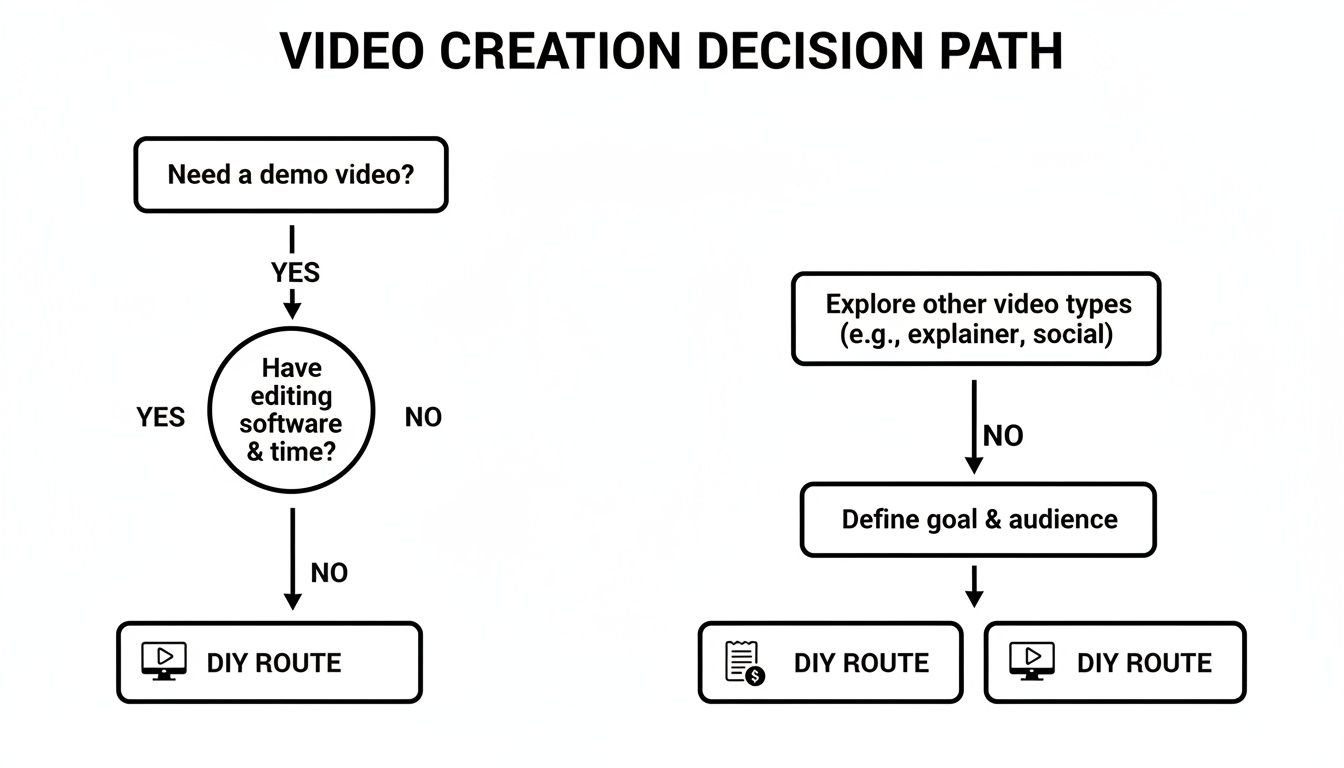
This decision tree shows the common paths SaaS teams take when they need a new demo video. Most end up stuck in one of two inefficient loops.
The visualization makes it obvious. The DIY and Agency routes are common, but they’re filled with traps like wasted time or excessive costs, which is why a more structured, framework-driven approach is so necessary.
Comparing Video Production Approaches for SaaS Demos
When you step back, you really only have three ways to create a demo video. Each comes with significant trade-offs in cost, speed, and most importantly, strategic effectiveness. Understanding these differences is key to picking a path that actually helps you hit your business goals, not just your immediate deadline.
A framework is your best defense against "feature dumping"—the number one killer of demo video engagement. Without a narrative structure, the natural tendency is to just list everything your product can do, which overwhelms and bores the viewer into clicking away.
For a deeper dive into how video fits into your broader marketing, check out our guide on building a video marketing funnel blueprint. It connects the dots between different video types and where they fit.
Here's a straightforward look at how the three approaches stack up.
Attribute
The DIY Trap
The Agency Drain
The Framework Approach
Primary Focus
Getting something done quickly
High-production value and creative concepts
Structured clarity and conversion
Average Cost
Low (software subscriptions)
High ($5,000 - $25,000+)
Moderate and predictable
Typical Timeline
Days to weeks (with many revisions)
6-12 weeks
Hours to a few days
Strategic Input
Relies entirely on your own expertise
Can be insightful but often overproduced
Built-in, based on proven formulas
Scalability
Very low; each video is a new project
Low; expensive and slow to iterate
High; repeatable and efficient
Common Outcome
An amateurish video that lacks polish and a clear message.
A beautiful video that may miss the mark on core user problems.
A clear, professional video that drives a specific action.
Laying it out like this makes the choice pretty clear, doesn't it? The chaos of DIY leads to inconsistent quality, while the agency model is just too slow and expensive for the fast-paced needs of most SaaS businesses.
A modern SaaS product demo video maker built on a framework philosophy offers the only truly scalable and effective solution. It gives you the guardrails of a proven narrative, ensuring your final video is not just visually appealing, but strategically sound.
How to Script a Demo That Actually Converts
Even the most beautiful, high-budget video will completely fall flat if the script is a mess. A great script doesn't just list features; it tells a story that guides your ideal customer from their painful problem straight to your elegant solution. It's the blueprint for a video that persuades someone to actually do something.
Without a solid script, you’ll inevitably fall into the "feature dumping" trap. You start clicking through your UI, narrating every button and menu, and before you know it, your viewer's eyes have glazed over. They couldn’t care less about your ten different settings—they care about solving their one big problem.
A powerful script focuses on a single, compelling narrative. It respects the viewer's time by getting straight to the point and showing them a better way forward. This is how you turn a simple screen recording into a strategic sales asset.
Start with the One Thing
Before you write a single word, you have to answer this question: What is the one thing my viewer absolutely must understand after watching this video? Not five things. Not three. Just one.
This is your core message, and it needs to be simple, direct, and focused on an outcome.
Bad: "This video will show you our dashboard, reporting features, and user management settings."
Good: "This video will show you how to find and fix overspending in your AWS account in under 60 seconds."
The first one is a tour; the second is a promise. Your entire script must be engineered to deliver on that one promise. Every scene, every line of dialogue, and every click on the screen has to serve that core message. If it doesn't, cut it. Be ruthless.
Tailor the Narrative to the Audience
The story you tell a founder desperate to fix their landing page conversion is completely different from the one you tell a developer who just needs to integrate an API. Your script has to speak their language and address their specific pains.
For Founders & Indie Hackers: Frame your script around speed and ROI. Show them how your tool saves them time or makes them money. Use phrases like "eliminate manual work" or "get insights instantly."
For Product Managers & Devs: Focus on clarity, workflow, and scalability. Your script should highlight how a feature reduces support tickets, improves documentation, or helps align stakeholders. Show the process, not just the final result.
This is exactly why a one-size-fits-all demo video rarely works. You have to decide who you're talking to and write a script that sounds like you live in their world.
The goal of a script isn't to be clever; it's to be clear. A confused viewer never converts. Your job is to connect their specific problem to your specific solution so cleanly that the next step feels obvious.
Staring at a blank page is intimidating. The good news is, you don’t have to anymore. Modern SaaS product demo video makers often have AI-assisted tools that can get you from zero to a solid first draft in minutes. You just feed it your core message, target audience, and a few bullet points about the workflow, and it generates a structured script for you.
This isn't about replacing human creativity; it's about automating the grunt work. An AI-generated draft gives you a foundation to build on, complete with a logical flow and a surprisingly human-sounding voiceover. You can then spend your time refining and polishing it, saving hours of effort.
Ultimately, a repeatable scripting process is your greatest asset. For more hands-on guidance, we put together a detailed walkthrough on how to make a script that gives you a practical framework for turning ideas into compelling narratives.
From Script to Screen: Production Tips That Matter
You've nailed the script and have a solid framework in place. The story is ready. Now comes the part where so many SaaS teams stumble: turning that script into a video that looks and sounds genuinely professional, not like something rushed together between meetings.
This is where execution makes all the difference. A polished final product isn’t about big budgets or flashy camera work. It’s about getting a few key technical details right to build trust and keep your message crystal clear.
The goal is to make the production so seamless the viewer doesn't even notice it. You want them focused entirely on your product's value, not distracted by a jumpy cursor or muddy audio.
Nailing the Screen Capture
The foundation of any good SaaS demo is a clean screen capture. If you get this wrong, the entire video feels amateurish. The secret is all in the prep work—creating a pristine, distraction-free environment before you even think about hitting record.
Your screen should be a clean stage, not a mirror of your chaotic workday.
Tidy Up Your Digital Workspace: Close every single unnecessary browser tab. Mute all notifications—Slack, email, calendar reminders. Nothing kills the flow faster than a pop-up from your team's #random channel.
Use a Clean Browser Profile: Set up a dedicated browser profile just for recording demos. It should have zero extensions, no cluttered bookmarks bar, and no personal history. This gives you a generic, universally relatable view.
Move with Intention: Your mouse cursor is the viewer's guide. Move it smoothly and deliberately, not in frantic, jerky motions. Let it rest for a beat on key elements you're discussing to draw the eye.
This isn’t just about being neat; it’s about respecting the viewer’s focus. A clean capture environment signals professionalism and lets your product be the star.
Demystifying the Voiceover
Believe it or not, your video’s audio is more important than its visuals. People will forgive a slightly imperfect screen, but they will instantly click away from a video with tinny, echoing, or unclear audio. You have two great options for narration, each with its own pros and cons.
Option 1: The Modern AI Voice
AI voice generation has come an incredibly long way. The robotic, monotone voices of the past are gone, replaced by narration that's astonishingly realistic and expressive. For a SaaS product demo video maker, using AI for voiceovers is a massive efficiency booster.
It's fast, affordable, and perfectly consistent. If you need to tweak one sentence in your script six months from now, you can regenerate that line in seconds. No need to re-book a voice actor and try to match the original recording setup.
Option 2: The Professional Human Voice
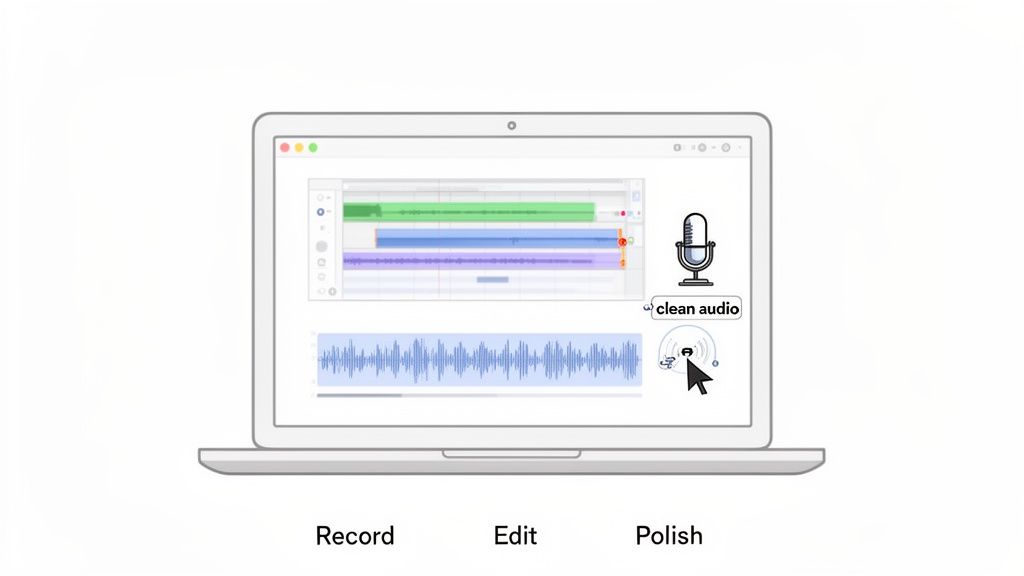
For a major brand launch or a high-stakes hero video, a professional human voice actor can bring a layer of warmth and nuance that AI is still chasing. But this path requires a quiet recording space, a quality microphone, and some basic audio editing skills to clean up background noise and balance the levels. If you're on camera, lighting is another critical piece of the puzzle. You can get up to speed by reviewing some key tips for lighting for video recording.
Editing with Purpose, Not Flair
Editing is where your story, visuals, and audio finally come together. The goal isn't to cram in flashy transitions or over-the-top effects. It's to enhance clarity and maintain pacing. Great editing in a SaaS demo is completely invisible.
Think of it as tidying up the narrative. You’re cutting out the "ums," awkward pauses, and any moments where the on-screen action doesn't sync with the voiceover. Your timeline should feel tight and purposeful, guiding the viewer from one point to the next without wasting a single second.
This is also your chance to add subtle but powerful visual aids:
Strategic Zooms: Gently push in on key UI elements right as you mention them. This directs the viewer’s attention exactly where it needs to be.
Simple Callouts: Use clean, on-brand text boxes or arrows to highlight a specific button or data point.
Branded Bumpers: A short, professional intro and outro with your logo will frame the video and reinforce your brand identity.
While choosing from the top video editing software is helpful, remember that technique matters far more than the tool itself. A polished demo is the result of clean recording and purposeful, clarity-focused editing—not a Hollywood budget.
How to Distribute Your Demo for Maximum Business Impact
So, you’ve built a polished demo. The script is tight, the UI looks clean, and the voiceover is crisp. But hitting "export" isn't the finish line. A great video sitting on your hard drive has an ROI of exactly zero.
The real work starts now. A video is only effective if the right people see it at the right time. Smart distribution is what separates a pretty file from a business asset that actively drives sign-ups, boosts user activation, and cuts down on support tickets.
This isn’t about just blasting a link everywhere you can think of. It’s about adapting your core video to fit the context of each channel, making sure the message lands perfectly whether someone is on your website or scrolling through a social feed.
Adapt Your Video for Every Channel
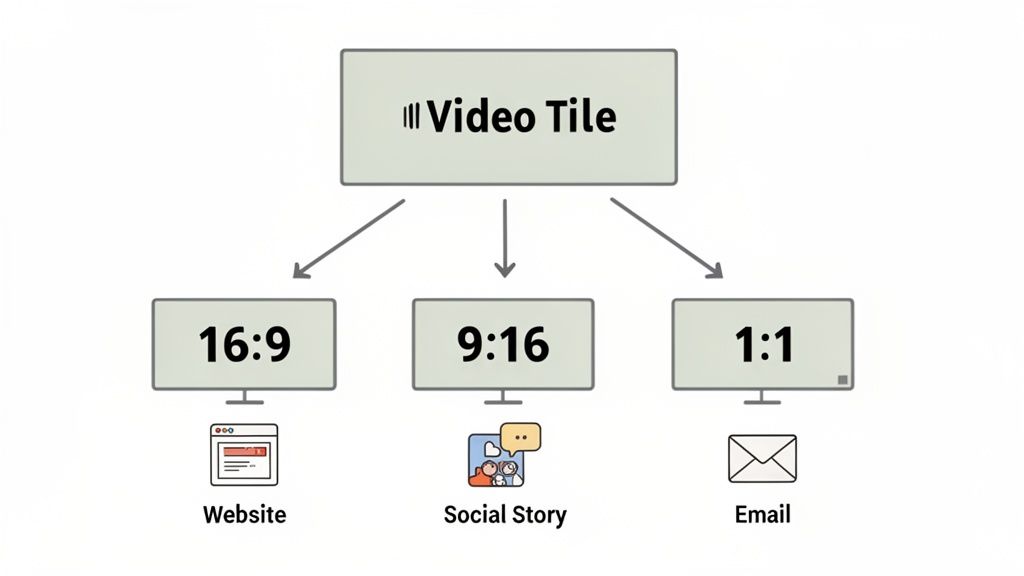
One video can't rule them all. The 16:9 widescreen video that’s perfect for your website will feel awkward and get cropped on a mobile-first platform. A modern SaaS product demo video maker should give you multiple aspect ratios from a single project, making this adaptation painless.
Here’s a quick breakdown of the primary formats:
16:9 (Widescreen): This is your hero format. It’s perfect for your landing page, product pages, and help docs. It gives you a full, cinematic view of your software in action.
1:1 (Square): The go-to for social feeds like LinkedIn. A square video takes up way more screen real estate on a phone, making it much harder to scroll past.
9:16 (Vertical): Built for Stories, Reels, and Shorts. These platforms demand fast-paced, vertical content with bold captions, since most users watch with the sound off. Your 90-second demo can become three snappy 15-second clips highlighting key outcomes.
Think of it like this: your main 16:9 demo is the full album. The 1:1 and 9:16 versions are the hit singles, remixed for different audiences and environments. You create the core asset once, then strategically repurpose it.
Your Demo Distribution Checklist
A successful launch isn't about posting and praying. You need a thoughtful plan to place your video where it can do the most good. Here’s a practical checklist to get you started.
1. On Your Website and Landing Pages
This is non-negotiable. A demo video placed prominently on a landing page can significantly lift conversions by quickly answering the visitor’s main question: "How does this actually work?" It builds trust by showing, not just telling. For more insights, see how we approach using videos on landing pages.
2. In Your Email Onboarding Sequence
When a new user signs up, they’re motivated but often overwhelmed. Drop a concise demo into your first or second onboarding email to show them exactly how to get their first "Aha!" moment. This can dramatically boost user activation.
3. In Paid Ad Campaigns
Short, punchy versions of your demo are perfect for paid social. For these channels, the goal isn't to show every feature. Instead, focus on a single, compelling pain point and how you solve it to drive qualified clicks.
4. As a Sales Enablement Tool
Equip your sales team with targeted demos for specific use cases. A salesperson can send a follow-up email with a video showing the exact workflow a prospect asked about, making the conversation feel much more personal and effective.
Staying current with distribution is key, as email campaigns increasingly use concise demos for direct responses and social platforms demand unique format optimizations. You can learn more about these evolving video distribution strategies to stay ahead of the curve.
Measuring What Actually Matters
Don't get bogged down in vanity metrics like total views. The numbers that really matter tell you how your video is impacting your business goals.
Engagement Graph: Most video hosting platforms have this. It shows you exactly where people are dropping off. A big dip in the first 10 seconds means your intro isn't hooking them. A dip during a feature explanation might mean it’s too confusing.
Click-Through Rate (CTR): For videos with a call-to-action (CTA), what percentage of viewers are actually clicking it? A low CTR could mean your offer isn't compelling or the CTA itself isn't clear enough.
Conversion Rate: This is the ultimate metric. Of the people who watched your video, how many signed up for a trial? Use your analytics to track the user journey from video view to conversion.
The Forgeclips Approach: A System Built for SaaS
After battling the chaos of the DIY Trap and the sticker shock of the Agency Drain, you start to realize the problem isn't a lack of tools or talent. It's a broken process.
What SaaS teams really need is a reliable system—a middle path that delivers professional quality without the typical delays and sky-high costs. This is where the idea of a SaaS product demo video maker stops being just a tool and becomes a structured philosophy. It’s about replacing frantic improvisation with a proven system.
Forgeclips was built on this exact idea. We designed our entire workflow to be the logical answer to the problems we've all faced, giving you the strategic clarity of a framework with the speed of modern production. Our approach gets rid of the guesswork and gives you a predictable path to a video that actually works.
AI-Fast and Studio-Perfect
The process isn't complicated because it shouldn't have to be. You pick a video framework that lines up with your goal, send over your product details and screen recordings, and our hybrid system takes it from there.
It's a model that gives you the best of both worlds:
AI-Assisted Production: We use AI for the heavy lifting—things like structuring the script and generating a clean, consistent voiceover. This part is incredibly fast and efficient.
Human-Polished Editing: After the AI does its job, every single video is finished by a professional human editor. They're the ones who polish the pacing, add subtle on-brand graphics, and make sure every zoom and transition enhances your story.
This unique combination gives you the speed and affordability of automation without ever sacrificing the final polish that builds viewer trust.
You don't get a cookie-cutter video that sounds like a robot. You get a studio-quality asset, delivered in days, that’s built on a foundation of proven marketing logic. It’s the efficient, scalable system that SaaS companies have been missing all along.
Your Top Questions, Answered
When it comes to creating a SaaS demo video, a few questions always come up. Here are some straight answers based on what we see work time and time again.
How Long Should a SaaS Product Demo Video Be?
For a video on your landing page or in an ad, stick to 60-90 seconds. That's the sweet spot. It gives you just enough time to hook the viewer with the problem, show them how your product is the hero, and hit them with a clear call-to-action before they lose interest.
If you're making a more detailed feature explainer or an onboarding video, you can stretch it to 2-5 minutes. But honestly? Shorter is almost always better.
What’s the Difference Between a Product Demo and an Explainer Video?
It really comes down to the why versus the how.
An explainer video is all about the ‘why.’ It tackles the big-picture problem your customers face and introduces your value proposition, often using animation to make a complex idea feel simple. It’s about building conceptual understanding.
A product demo shows the ‘how.’ This is where you get into your actual product interface to demonstrate specific features and workflows. It’s about tangible proof—showing, not just telling—and it builds a ton of trust by proving your claims are real.
Should I Use an AI Voiceover for My Demo Video?
Absolutely. Modern AI voices are shockingly realistic, and they offer a fast, affordable way to get high-quality, consistent audio for your videos.
They're a lifesaver when you need to update a script or create multiple versions of a video without re-hiring a voice actor. That said, for a major flagship brand video or a big launch, a professional human voice actor can still add a unique warmth and personality that might be worth the investment.
Can I Create Different Demo Videos for Different Audiences?
Not only can you, but you absolutely should. A one-size-fits-all demo is a missed opportunity. A SaaS founder cares about ROI and conversion rates. A product manager cares about workflow efficiency and reducing support tickets. You should create short, targeted demos that speak directly to each audience's unique pain points.
What is the Most Common Mistake in a SaaS Demo Video?
The most common mistake is "feature dumping." This happens when the presenter simply narrates the UI, clicking through every single button and menu without connecting it to a real-world problem. It’s boring, overwhelming, and completely ignores the viewer's goal. Always focus your video on solving one specific problem, not showcasing every single feature.
Ready to stop wrestling with slow agencies and clunky DIY tools? The Forgeclips system gives you a structured, framework-based approach to get studio-quality videos in days, not months. Start Creating High-Performing Videos.